

1. Introduction
1.1
RPi PX00 Expansion A is a GPIO expansion board designed specifically for the Raspberry Pi X00 series. It extends the compact 40-pin GPIO header from the mainboard, providing convenient access to sensors, external modules, HAT boards and jumper wiring. With easy installation and solid mechanical support, it improves expansion capability and project flexibility.
1.2 Features
- Dedicated Compatibility:Precisely designed for Raspberry Pi X00, matching the 40-pin GPIO header location for stable installation and reliable electrical contact.
- Full 40-Pin Breakout:Follows the standard Raspberry Pi 40-pin GPIO layout. Supports GPIO / I²C / SPI / UART and more—ideal for peripheral expansion and controller applications.
- Convenient Expansion Interface:Extends the GPIO header to a more accessible position, reducing cable congestion and improving wiring reliability when connecting sensors or external modules.
- Easy Installation:Compact design with included screws. No additional tools required, suitable for desktop use or internal mounting inside enclosures.
1.3 Specifications
Dimensions |
| |
| M2.5 |

1.4 Module Resources
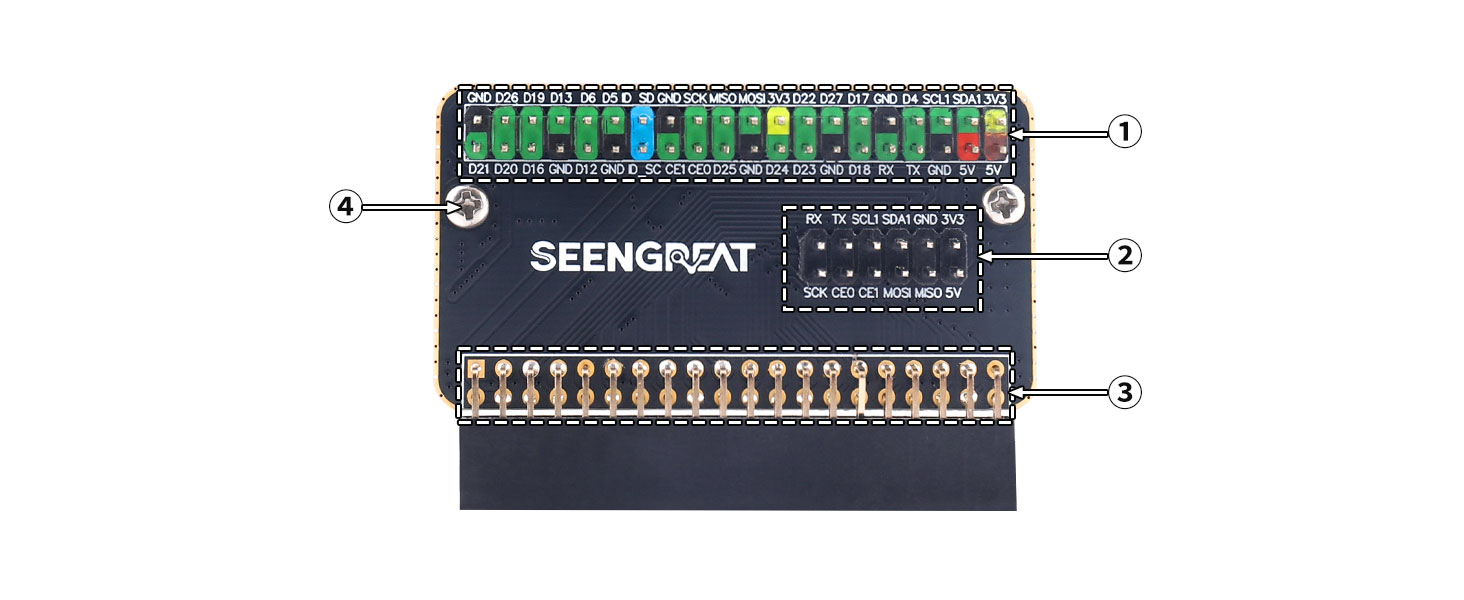
①Raspberry Pi 40-pin GPIO breakout
②Commonly used GPIO function pinout
③Raspberry Pi X00 board-to-board connector
④M2.5 mounting holes
2. Usage
2.1 Hardware Description
The onboard 2×6-pin connector provides quick access to frequently used GPIO pins.The 40-pin header retains the official Raspberry Pi numbering and functionality.
